Zentry Console · SIEM & Audit
SIEM Integration &
SIEM Integration &
Event Log
SIEM Configuration
Add a SIEM integration from your organization's page. Each organization can configure a single collector destination.
- Description — a short label for the integration.
- SIEM platform — Huntress HEC or Generic Splunk HEC.
- Collector URL — the HTTP Event Collector endpoint. Huntress fills in a default; Splunk uses your own HEC URL.
- Token — the HEC token, sent on every push as the Splunk HEC authorization header.
Delivery:
each event is pushed once as a JSON document (time, message, and the event payload). A push is recorded as Delivered on a 2xx response, otherwise Failed with the response or exception captured as the failure reason. There are no automatic retries today.
Back to top
Event Log
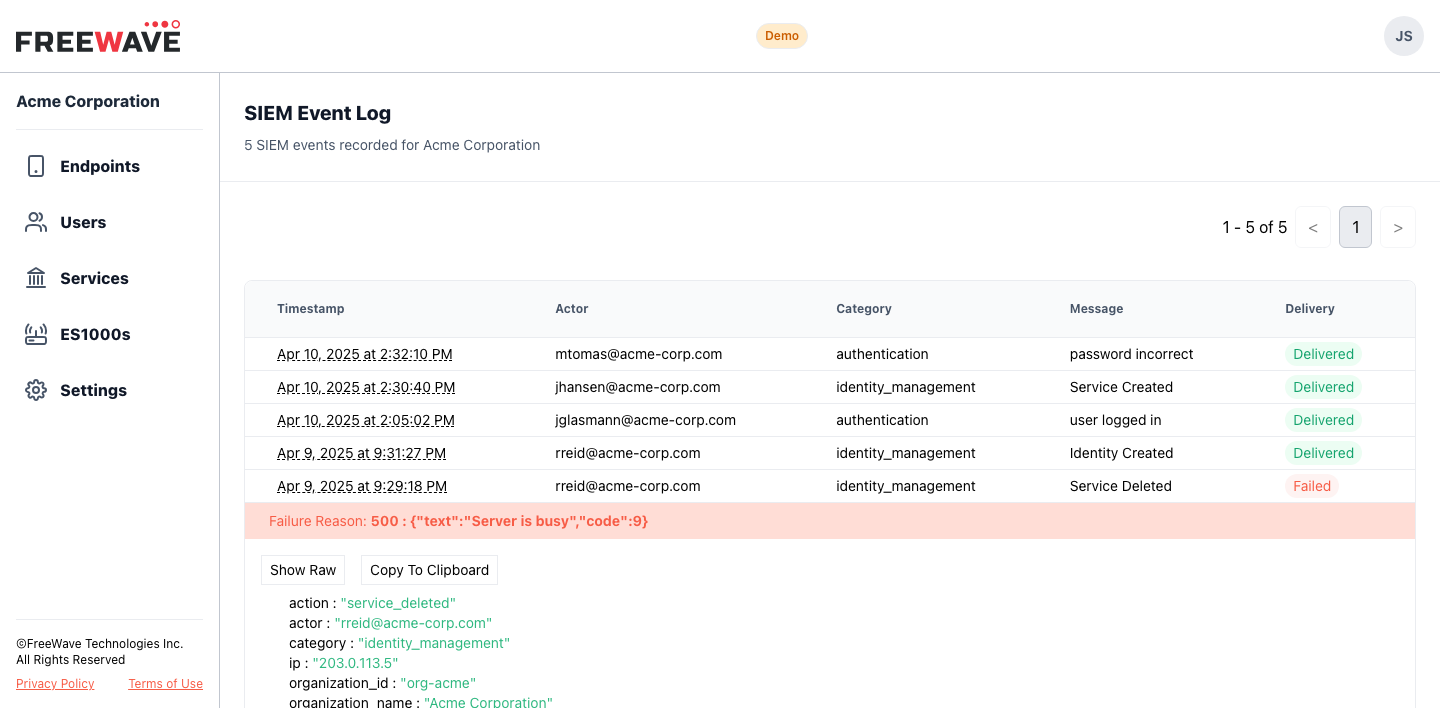
The SIEM event log lists every event recorded for an integration, newest first. Open it from the integration's row on the organization page.
- Columns — timestamp, actor, category, message, and delivery state (Delivered / Failed).
- Row expand — click a row to reveal the full structured JSON payload; failed deliveries also show the failure reason.
Event Catalog
Every auditable event, its category, and the fields included in the forwarded payload.
| Event | Category | Description |
|---|---|---|
user_login_attempt
|
authentication |
Login attempt, success or failure
actor, ip, result, failure_reason
|
user_login_lockout
|
authentication |
Account locked after too many failed login attempts
actor, ip, lockout_reason, lockout_until
|
identity_created
|
identity_management |
Identity created
actor, ip, identity_id
|
identity_revoked
|
identity_management |
Identity removed from the organization
actor, ip, identity_id
|
service_created
|
identity_management |
Service created
actor, ip, service_id, service_name
|
service_updated
|
identity_management |
Service configuration modified
actor, ip, service_id, service_name
|
service_deleted
|
identity_management |
Service removed
actor, ip, service_id, service_name
|